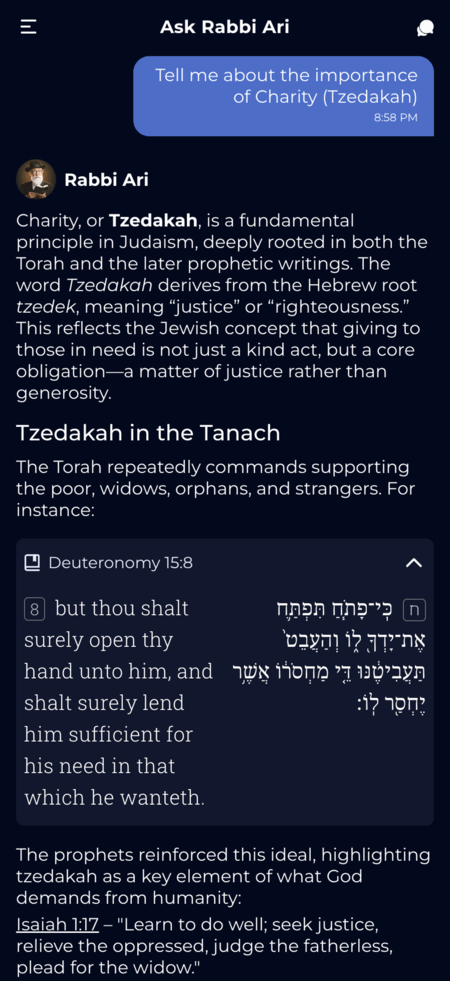
Boost engagement and keep users coming back. Rabbi AI answers Jewish questions with verified sources. Free widget, zero maintenance - you embed, we handle everything.

Rabbi AI isn't just a feature - it's a growth engine. Over 1,000,000 questions answered and counting.
Users don't just read - they ask follow-up questions. Interactive content keeps them engaged longer and brings them back daily.
Users ask, get answers backed by Torah and Talmud citations, and stay. No waiting, no guessing - just trusted knowledge.
Stand out with a unique 'Ask a Rabbi' feature. No competitor offers this level of intelligent Jewish guidance.
10 languages built-in: English, Hebrew, Spanish, Portuguese, French, German, Italian, Russian, Polish, Korean. One widget, worldwide reach.
We handle servers, updates, and AI improvements. You embed once and forget about it. It just works.
No licensing fees, no revenue share, no hidden costs. Test it now without any signup required.
Simple for you. Valuable for your users. Here's the model:
Copy a few lines of code. Works on any website, app, or platform. Takes less than 5 minutes.
Your users get 3 premium AI responses daily with our most advanced model. After that, they can continue with unlimited standard responses - still with verified sources, still valuable.
Most users are happy with unlimited daily questions on your platform. The few who want even more can continue in our app - that's the trade-off: you add value to your users, we get to reach more users. Fair deal.
Verse-by-verse questions? Hebrew terms? Jewish context? Let users ask and get source-backed answers.
Turn support into understanding: explain Jewish holidays, prayers, Tanakh context, and Israel-related passages.
Add an "Ask about this article" widget-users ask follow-up questions and get Jewish perspective (with sources).
Give learners a 24/7 study partner between sessions-great for homework, prep, and discussion prompts.
Answer common questions anytime (holidays, practices, definitions) and reduce support load.
Parasha, holiday, calendar, zmanim, siddur-let users ask about what they're already viewing.
Help users understand passages and concepts while reading-citations make it easy to verify and go deeper.
Trusted by thousands of users worldwide, Rabbi AI provides authentic Torah wisdom backed by verified sources from our extensive Jewish text library.
Every answer is grounded in authentic Jewish texts including Torah, Talmud, and Midrash. Rabbi AI's responses include direct citations, making it easy to verify and dive deeper into each teaching.
Customize the widget for your audience. Copy the code when you're ready.
Question is sent automatically when widget opens
Your Widget URL:
https://widget.rabbiai.app/en/chat/rabbi?display-mode=auto Add Rabbi AI to your website or mobile app in under 5 minutes. No signup required.
<div style="width: 100%; height: 600px; border-radius: 12px; overflow: hidden; box-shadow: 0 4px 12px rgba(0,0,0,0.1);">
<iframe
src="https://widget.rabbiai.app/en/chat/rabbi?display-mode=auto"
width="100%"
height="100%"
frameborder="0"
title="Rabbi AI Chat">
</iframe>
</div>import UIKit
import WebKit
class ViewController: UIViewController, WKNavigationDelegate {
var webView: WKWebView!
override func viewDidLoad() {
super.viewDidLoad()
webView = WKWebView()
webView.navigationDelegate = self
view = webView
let url = URL(string: "https://widget.rabbiai.app/en/chat/rabbi?display-mode=auto")!
let request = URLRequest(url: url)
webView.load(request)
}
}import android.os.Bundle
import android.webkit.WebView
import android.webkit.WebViewClient
import androidx.appcompat.app.AppCompatActivity
class MainActivity : AppCompatActivity() {
private lateinit var webView: WebView
override fun onCreate(savedInstanceState: Bundle?) {
super.onCreate(savedInstanceState)
setContentView(R.layout.activity_main)
webView = findViewById(R.id.webview)
webView.webViewClient = WebViewClient()
webView.settings.javaScriptEnabled = true
webView.loadUrl("https://widget.rabbiai.app/en/chat/rabbi?display-mode=auto")
}
}No developer? No problem. Here's where to paste the code:
Add a Custom HTML block and paste the embed code
Use the Embed HTML element in your editor
Add a Code Block and paste the iframe
Use the Embed element in your design
Add to a Custom Liquid section or page template
Paste the HTML anywhere in your page
| Parameter | Values | Description |
|---|---|---|
| {lang} | en | he | pt | es | fr | de | pl | it | ru | ko | Sets the interface and AI language. Supports English, Hebrew, Portuguese, Spanish, French, German, Polish, Italian, Russian, and Korean. |
| display-mode | day | night | auto | Controls the visual theme. 'Auto' detects system preference. |
| message (optional) | string | Pre-fills the chat input with a default message. Useful for guiding users to ask specific questions or providing context. Example: "Tell me about Shabbat traditions" |
| force (optional) | true | When set to 'true', automatically sends the message parameter to Rabbi AI immediately upon widget load. Only include if you want auto-send behavior. |
| ref-text (optional) | string | Provides reference context for questions. Useful when you want users to ask questions about specific content like articles or documents. Max 3000 characters. For larger context needs, please contact us. |
One plan. Everything included. Free.
forever
Everything you need to add Rabbi AI to your platform
Everything platform owners ask before embedding
Have questions about Rabbi AI Widget? We'd love to hear from you!
We are dedicated to helping people study Jewish texts in the digital age. Our mobile applications help thousands of people study Torah, Mishnah, and Gemara daily. Rabbi AI is our latest innovation, bridging the gap between ancient wisdom and artificial intelligence.
Contact us: [email protected]